
A spare key isn’t always a DIY job, but you may be able to program it yourself. Spare car key programming depends on the vehicle: some models let owners pair a key fob by following the owner’s manual, while others require specialized equipment. Check the manual before trying any programming sequence.
It’s reasonable to want a working backup without paying for work you can handle yourself. This guide shows you how to find vehicle-specific instructions, recognize when DIY programming may work, and know when a locksmith may be needed. You’ll also learn what affects a locksmith quote, including the key type, vehicle requirements, and whether the key needs cutting as well as programming. The price depends on the case and is provided after a quote request.
Key Takeaways
- Use your owner’s manual to find out whether your vehicle supports owner programming and follow its exact sequence.
- Check that a replacement key matches your vehicle’s key type and works with its immobilizer before attempting to pair it.
- If you don’t have a working key, look for the vehicle-specific process before trying anything; some systems require programming equipment.
- Compare locksmith quotes by checking what they include, such as the key, cutting, programming, and any vehicle-specific requirements.
- Test the spare after programming to confirm it starts the vehicle and performs the functions you need.
Checking the owner's manual for programming instructions
Aftermarket keys and online fobs may have the wrong blade profile, chip, or frequency for your vehicle. A mismatch can prevent the key from starting the car, operating remote functions, or pairing, even if the fob looks identical. Check compatibility before buying a replacement.
To find a car key programming service near you, look for an automotive locksmith who can identify your vehicle and key type. A clear quote should state whether the work includes cutting, programming, or both.
- Find the correct manual. Use the owner’s manual for your exact vehicle, not a similar model year. Check the index for “keyless entry,” “remote transmitter,” “key fob,” or “immobilizer.” Some manuals explain whether the remote is self-programmable; others direct owners to vehicle-specific service instructions. Keep the manual open while following each step.
- Separate pairing instructions from battery guidance. The manual may describe replacing a fob battery without explaining how to program a new fob. These are different tasks. A battery change restores power to an existing remote; pairing teaches the vehicle to recognize a replacement. Don’t assume that a working remote after a battery change proves a new key can be programmed at home.
- Check the fob battery before diagnosing pairing. A weak battery can make buttons respond inconsistently or stop responding. Car key fob batteries typically last 2-3 years, and most are small watch batteries costing a couple of dollars. Match the battery type shown in the manual or inside the fob, then observe polarity when installing it.
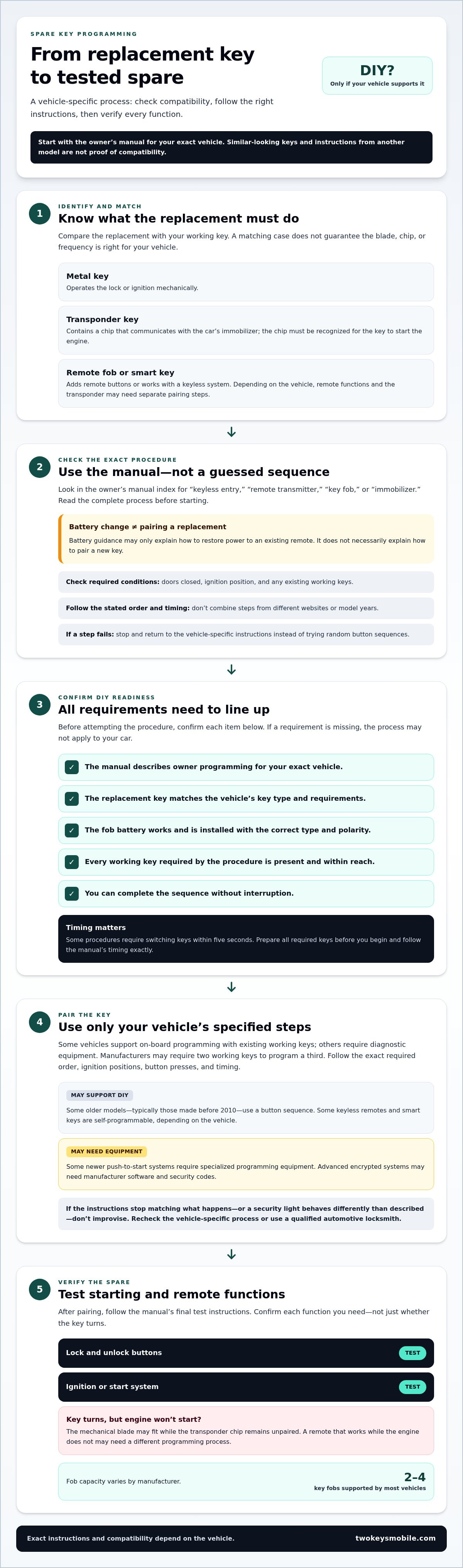
- Read the complete sequence first. Look for required conditions such as doors closed, a particular ignition position, or existing working keys. Follow the vehicle’s stated order and timing exactly. Don’t combine steps from different websites or another model’s manual. If a step fails, stop and return to the instructions rather than repeating random button sequences.
- Use this DIY readiness checklist. Confirm that the manual describes owner programming, the replacement key matches the vehicle, the fob battery works, and every required working key is present. Make sure you can complete the sequence without interruption. If any requirement is missing, the procedure may not apply to your car.
- Test each function after pairing. Follow the manual’s final test instructions. Check the lock and unlock buttons, then test the key in the ignition or start system as applicable. If the remote works but the engine won’t start, or the security indicator behaves unexpectedly, the fob may need a different programming process. Spare car key programming depends on the vehicle’s system, so use its exact instructions.
Can I program a key fob myself?
Sometimes. Your vehicle’s make, model, and key system determine whether owner programming is possible. To program a spare transponder key, follow the vehicle-specific procedure and use a working key if required. The chip must communicate with the car’s immobilizer before the key can start the engine.
-
Identify the Key Type
Identify what your current key does and what the replacement must do. A basic metal key operates the lock or ignition mechanically. A transponder key contains a chip that communicates with the car’s immobilizer. Remote fobs add buttons for functions such as locking and unlocking, while smart keys work with keyless systems and use a different pairing process.
Compare the replacement’s blade, buttons, and electronic functions with your working key. Similar-looking cases don’t guarantee compatibility. Depending on the vehicle, the transponder chip and remote functions may also require separate pairing steps.
-
Check Self-Programming Options
Look up the exact model’s self-programming instructions before attempting a sequence. Some keyless entry remotes and smart keys are self-programmable, but whether an owner can pair them depends on the vehicle. Some older models, typically those made before 2010, use a button sequence. Smart keys with push-button start are common in most vehicles from 2015 onward.
Follow only the procedure specified for your vehicle. Some newer push-to-start systems require specialized programming equipment, and advanced encrypted systems may need manufacturer software and security codes. Don’t use another model’s sequence or force the fob through a process the manual doesn’t describe.
-
Use an Existing Working Key
Gather every key required by the procedure before you begin. Some manufacturers require two working keys to program a third, while others use a different process. Follow the vehicle’s instructions for the required order and timing. Keep the replacement and existing keys within reach so you can complete each step without interruption.
Follow the specified steps precisely, including ignition positions and button presses. Some procedures require switching keys within five seconds, so prepare first. If the process stops or the security light behaves differently than the instructions describe, don’t improvise. Recheck the vehicle-specific steps before trying again.
-
Program a Spare Transponder Key
Use the exact procedure for your vehicle to pair a transponder key. The chip signals the immobilizer, which recognizes an authorized key. Some vehicles support on-board programming with existing working keys; others require diagnostic equipment. A generic sequence is no substitute for instructions tailored to your make and model.
After the procedure, test the spare by starting the engine, then check its remote buttons if it has them. Most vehicles support between 2 and 4 key fobs, depending on the manufacturer. If the key turns but won’t start the car, its mechanical blade may fit while its chip remains unpaired.
Finding vehicle-specific programming instructions
Use instructions for your exact vehicle, not a similar model. The correct procedure depends on the make, model, and key system.
- Record your vehicle details. Write down the make, model, model year, and trim before searching. These details help distinguish vehicles that share a name but use different key systems. Note whether your key has a metal blade, transponder chip, remote buttons, or smart-key functions, and include those details when looking for instructions.
- Search the owner’s manual first. Check the index for “key programming,” “remote transmitter,” “immobilizer,” or “keyless entry.” Read the entire procedure, including any requirements for existing working keys. The manual may say whether owners can program a key or whether the vehicle requires service. Don’t substitute steps from another model year.
- Use the manufacturer’s exact procedure. Search by make, model, and year, then compare the instructions with the manual. Confirm that they describe your key type, such as a transponder or smart key. A similar-looking fob may use a different programming method. Don’t combine sequences from different models or sources.
- Ask a dealership service center for the instructions. A dealership service center may provide self-programming steps by email, fax, or pickup. Give them your vehicle details and describe the key you’re trying to program. Follow the supplied sequence exactly. If it requires equipment you don’t have, don’t try to replace that step with an improvised button sequence.
- Check whether the vehicle needs diagnostic equipment. Some newer vehicles require dealer-level software or diagnostic equipment to program a spare key. Compare the stated requirements with the tools and access available to you. If the instructions specify equipment rather than an owner-operated sequence, the task isn’t suitable for DIY. Recognizing this can prevent wasted attempts.
- Account for older vehicle procedures. Some vehicles built before the early 2000s may allow owners to program a spare key without special tools. That doesn’t mean every older vehicle uses the same steps. Match the procedure to your make, model, and year, then check whether it requires an existing working key. Test the programmed key according to the vehicle’s instructions.
Keep the instructions beside you during spare car key programming, and stop if the procedure or equipment requirements don’t match your vehicle. Accurate vehicle details are the starting point for finding the right process.
Programming a single key without an existing working key
Some manufacturers allow a single key to be programmed without an existing working key. The procedure depends on your vehicle. Guessing a programming PIN can lock the system and lead to costly reprogramming.
- Identify your vehicle and replacement key. Record the make, model, and model year before searching for a single-key procedure. Note whether the replacement has a transponder chip, remote buttons, or smart-key functions. The procedure must match both the vehicle and key type. An ignition sequence can’t make an incompatible chip work.
- Find instructions for the exact model. Start with the owner’s manual, then use vehicle-specific instructions from the manufacturer or a dealership service center. Some dealerships provide self-programming steps by email, fax, or pickup. Confirm that the instructions specifically cover programming without an existing working key. A procedure for adding a third key may not apply.
- Check whether the procedure is owner-operated. Some newer vehicles require dealer-level software or diagnostic equipment to program a spare key. If the instructions specify equipment, an ignition-only process won’t replace it. Check every stated requirement before starting, including any security code or PIN. Don’t guess a PIN, because an incorrect attempt could lock the system.
- Follow the stated ignition cycle exactly. For some manufacturers, the described single-key procedure keeps the ignition in the on position for 10 minutes and 30 seconds per cycle. It repeats the ignition-on cycle three times. Treat these details as a vehicle-specific example, not a universal method. Use them only when the instructions for your vehicle call for this process.
- Keep the sequence uninterrupted. Set aside the time required before starting the specified cycles. Follow the instructions for each ignition position and any pauses between cycles. Don’t add button presses or substitute steps from another model. If the procedure asks for a PIN, enter only the code provided for that vehicle. Guessing can lock the system.
- Test the new key using the vehicle’s instructions. After completing all three cycles, follow the specified confirmation and testing steps. Check that the key starts the engine and operates any included remote functions. If the vehicle doesn’t recognize the key, stop rather than repeating an unverified sequence. The next step depends on the vehicle’s programming requirements and equipment.
Losing every working key changes the process: the vehicle may require a dedicated all-keys-lost procedure. That is different from adding a spare while another key still works. Use instructions that explicitly cover your situation, especially before entering security information or starting timed ignition cycles.
Automotive locksmith programming costs
A locksmith quote depends on the key and programming work your vehicle requires. Compare what each quote includes, not just whether it says “programming.”
- Identify the key and vehicle. Gather your vehicle’s make, model, year, and key type before requesting a quote. A basic transponder key differs from a remote-head key, which combines the remote and key, or a smart key for a proximity system. The replacement’s design and electronics affect the work required.
- Separate programming from cutting. Ask whether the quote covers programming only or also cutting the blade. A replacement may need a blade cut to fit the ignition as well as electronic pairing with the vehicle. These are separate tasks, and a quote covering only one may not leave you with a fully usable key.
- Explain your key situation. Tell the locksmith whether you have a working key or need one made without it. Some vehicles allow a spare to be added using existing keys. An all-keys-lost situation may require a different procedure and equipment. Include this detail when requesting an estimate because it can change the work involved.
- Compare the included work. Check whether each estimate covers the replacement key, cutting, programming, and testing. Ask what happens if the buttons work but the engine won’t start, or if the vehicle rejects the chip. Compare estimates for the same vehicle and tasks rather than relying on incomplete totals.
- Consider the vehicle’s programming requirements. Some newer vehicles require dealer-level software or diagnostic equipment. The key system, vehicle model, and access requirements can affect the process. Key replacement and programming typically take 30 minutes to 2 hours, depending on make and model. That time estimate describes the work, not the price.
- Request a case-specific quote. The estimate depends on the key type, vehicle requirements, cutting and programming needs, and whether you have a working key. Share your vehicle details and describe the functions you need. Then compare quotes with the same scope so you can see exactly what each includes.
For a replacement key that needs both cutting and programming, request help with automotive key replacement and provide your vehicle details.
Two Keys Mobile: Automotive Key Replacement
Two Keys Mobile provides Automotive Key Replacement for vehicle keys that are missing, damaged, or unsuitable. If the manual requires equipment you don’t have, or the vehicle won’t recognize a replacement, professional key replacement can help address the problem. Two Keys Mobile also offers Emergency Vehicle Lockout Service if you’re locked out and can’t access the vehicle.
Before arranging help, note your vehicle’s make, model, and year. Describe whether you have a working key and whether the replacement needs a cut blade, remote functions, or a transponder chip. These details clarify the job and next steps. Two Keys Mobile serves Little Rock and surrounding areas.
For help with an automotive key replacement, contact Two Keys Mobile.
Set up your next step with confidence
A spare key is most useful when it’s ready before you need it. Decide whether to follow the vehicle’s owner-programming process or arrange help. For spare car key programming, keep the key’s functions and vehicle details together so you have a clear starting point if it needs attention later. Store the spare somewhere secure and accessible, and test it after programming to confirm what it can do.
If you need help beyond a programming attempt, Two Keys Mobile offers Automotive Key Replacement for vehicle key needs. It also offers Emergency Vehicle Lockout Service if you can’t access your car, and Residential Rekeying for home locks. Choose the service that fits your situation, then share the relevant details when you get in touch.
Contact Two Keys Mobile for help and take the next step toward a usable spare key.
Frequently Asked Questions
How long does it take to replace a car key fob?
Replacement and programming typically take 30 minutes to 2 hours, depending on the vehicle’s make and model. The process may involve cutting a key, pairing its electronics, and testing remote functions. A smart key or a vehicle with additional programming requirements can involve different steps than a basic remote. Share the vehicle details and key type when arranging service to help clarify what the job involves.
How many key fobs can be programmed to one vehicle?
Most vehicles can be programmed with between 2 and 4 key fobs, depending on the manufacturer. The limit applies to recognized fobs, not simply the number of keys you own. If you’re adding a spare, check whether the vehicle’s procedure replaces or retains previously paired fobs. This matters if a family member’s remote should keep working after the new one is added.
How to Program a Spare Car Key: Should You DIY or Call a Pro?
Choose DIY only when your vehicle’s instructions describe an owner-operated process and you have all the required keys. Professional help is the practical next step if the procedure calls for diagnostic equipment, the car won’t recognize the new key, or you’ve lost every working key. Consider the cost of an unsuccessful attempt, especially if the vehicle requires a security code or specialized programming.
How much does it cost to program a spare car key in the United States?
The price depends on the case and is given after a quote request. Key type, vehicle programming requirements, whether a working key is available, and whether the blade needs cutting all affect the work. Compare quotes by checking whether each includes the replacement key, cutting, programming, and testing. A programming-only quote may not cover everything needed for a fully usable spare.
Can I program a spare car key myself, or do I need a locksmith or dealership?
You can program the key yourself if your exact vehicle’s instructions allow owner programming and you meet every stated requirement. A locksmith or dealership may be needed when the process requires diagnostic equipment or all working keys have been lost. For example, a sequence for adding a third key won’t necessarily work when every key is lost.
How do you program a spare key fob or smart key?
Start with the exact instructions for your vehicle, then follow the sequence using the specified key and ignition or start controls. A remote’s lock buttons and a transponder’s engine-start authorization may require separate pairing. After programming, test the remote functions and try starting the vehicle. If one works but another doesn’t, the key may need an additional programming step.
Which car makes and models allow DIY spare key programming?
There isn’t one reliable make-and-model list that applies across model years and key types. Some older vehicles, typically those made before 2010, allow owners to program fobs with a button sequence. Some vehicles built before the early 2000s may allow programming without special tools. Check instructions for the exact year and model because equipment and procedures can differ.
What information and documents do I need to get a spare car key made?
Have the vehicle’s make, model, year, and an existing key ready, if you have one. Note whether you need a metal key, transponder, remote, or smart key. A locksmith may ask for documentation connecting you to the vehicle before making a key. For local automotive key replacement, Two Keys Mobile serves Little Rock, North Little Rock, Maumelle, Conway, Sherwood, Jacksonville, Cabot, Beebe, Bryant, Benton, East End, Mabelvale, and Mayflower.


