
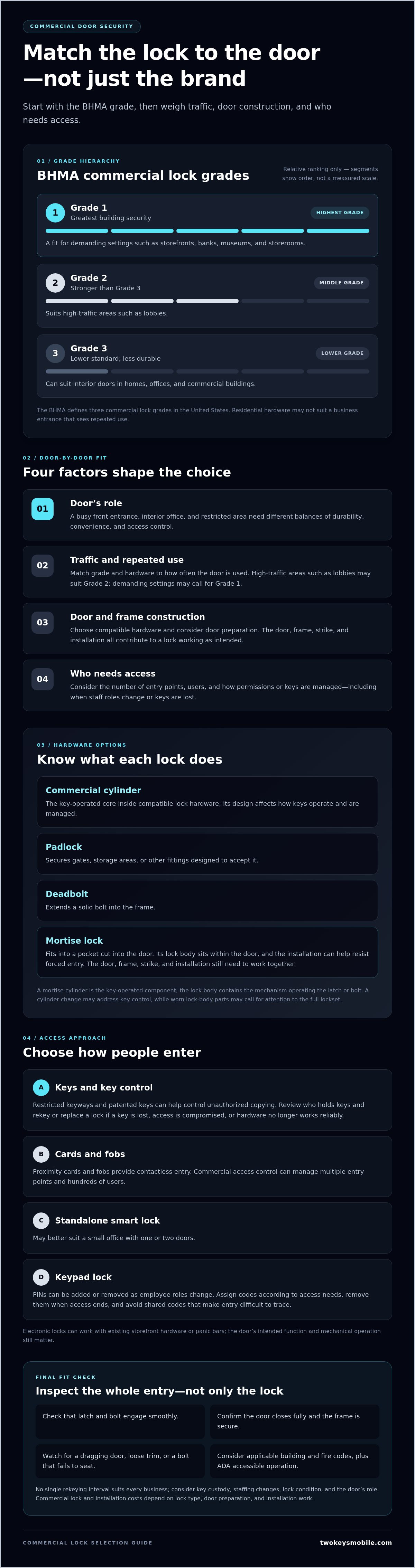
A lock’s grade matters as much as the door it protects. High security locks for business are commercial door locks selected by grade, door type, and access needs. In the United States, the BHMA defines three commercial lock grades: Grade 1 provides the greatest building security, while Grades 2 and 3 are held to a lower standard.
When choosing high security locks for business doors, consider more than the lock itself. The right option depends on how each door is used and who needs access. A busy entrance, an interior office, and a restricted area each call for a different balance of durability, convenience, and access control.
This guide explains how commercial locks work and how their grades compare. You’ll learn how mortise locks can help resist forced entry, which hardware may suit different business doors, and how key controls and access options fit into a practical security plan.
Key Takeaways
- Match lock type and grade to the door’s use, traffic, and security needs instead of choosing by appearance alone.
- Compare cylinders, padlocks, deadbolts, and mortise locks to understand how each fits a business’s entry points.
- Consider how a mortise lock’s installation can support resistance to forced entry, especially on demanding commercial doors.
- Reduce key-copying risks by reviewing who holds keys and how access is managed, including when keys are lost or staff changes.
- For a business door that needs new hardware, commercial lock installation can help put the selected solution in place.
What is a commercial door lock?
A commercial door lock controls entry to a business, from the front entrance to an interior office. Choose the type and grade according to the door, its traffic, and who needs access.
Commercial Lock Types
A commercial cylinder is the key-operated core inside compatible lock hardware. Its design affects how keys operate and are managed. Padlocks secure gates, storage areas, or other fittings designed to accept them. A deadbolt extends a solid bolt into the frame, while a mortise lock fits into a pocket cut into the door. Match each type to the door’s construction and daily use.
High-Traffic Lock Grades and Security Needs
The BHMA defines three levels of commercial lock grades in the United States. Grade 1 is described as providing the greatest building security, making it a fit for demanding settings such as storefronts, banks, museums, and storerooms. Grade 2 is stronger than Grade 3 and suits high-traffic areas such as lobbies. Grade 3 is less durable and can suit interior doors in homes, offices, and commercial buildings. Residential hardware may not suit a business entrance that sees repeated use.
For frequent entry, proximity cards and fobs let users unlock doors with contactless credentials. Commercial access control can manage multiple entry points and hundreds of users. A standalone smart lock may better suit a small office with one or two doors. Electronic locks can also work with existing storefront hardware or panic bars, helping preserve the door’s intended function.
Brand and Model Security Selection
No single brand or model is the strongest choice for every commercial door; compare the lock’s grade, type, and fit with the door. The Schlage L9040 is a mortise lock, an example of a commercial mortise design rather than a universal recommendation. For high security locks for business, start with the door and its use, then select hardware that matches the required level of durability and access control.
Codes, Costs, Key Control, and Lock Management
In the United States, commercial door requirements may involve building and fire codes that apply to the property and the door’s function. Accessibility planning must consider the Americans with Disabilities Act (ADA); some commercial lock styles, such as cylindrical knobs, are cited as not meeting this standard. Choose hardware with the door’s use and accessible operation in mind.
Commercial lock and installation costs depend on the lock type, door preparation, and installation work; pricing is provided after a quote request. Restricted keyways and patented keys can help businesses control unauthorized key copying, which is useful when key distribution needs closer oversight.
Poor installation can leave a lock misaligned or difficult to operate. Weak key management can leave access with people who no longer need it. Rekey or replace a lock if a key is lost, access is compromised, or the hardware no longer works reliably. No single rekeying interval suits every business; consider key custody, staffing changes, lock condition, and the door’s role.
Mortise locks and forced-entry resistance
Mortise locks are widely used in commercial buildings because they are durable and resistant to forced entry. Unlike a surface-mounted lock, a mortise lockset sits inside a pocket cut into the door. This construction places the lock body within the door rather than attaching it only to the surface. Mortise locks are also more difficult to kick in because they are set into the door frame. The lock still depends on the door, frame, strike, and installation working together.
Assess the entire entry, not just the lock case. A strong mortise lock cannot compensate for a damaged frame or a poorly aligned strike. Check that the latch and bolt engage smoothly, the door closes fully, and the frame is secure around the hardware. These checks matter at storefront entrances, where frequent opening and closing can reveal alignment problems. Regular inspections can catch a dragging door, loose trim, or a bolt that fails to seat correctly.
A mortise cylinder is the key-operated component fitted into compatible mortise hardware. It determines how the key engages the lock, while the lock body contains the mechanism that operates the latch or bolt. Keep those parts distinct when assessing a repair or replacement. A cylinder change may address key control, while worn or damaged lock-body parts can call for attention to the full lockset. The Schlage L9040 is one example of a mortise lock, but a model name alone does not determine suitability for every door.
Keypad locks can provide controlled entry without issuing a physical key to every employee. A keypad cylindrical lock uses a code with cylindrical hardware; a keypad mortise lock combines code entry with a mortise lock body. Businesses can add or remove PINs as employee roles change. Assign codes according to access needs, remove them promptly when access ends, and avoid shared codes that make entry difficult to trace. Electronic locks can simplify access changes, but the door’s fit and mechanical operation still matter.
Choose the arrangement by checking door construction, expected use, and who needs entry. For a high-use exterior door, prioritize a durable mortise lock and sound frame engagement; for an interior staff door, keypad access may better match changing permissions. A locksmith can assess whether the existing door and frame suit the selected hardware. Consider mortise lock fit and installation as part of the door’s overall forced-entry resistance.
Choosing locks for different doors
Choose a lock to match each door’s use, traffic, construction, and access needs. Select compatible hardware, install it to fit the door, and test that it works correctly.
Door-Specific Lock Selection
A front entrance faces different demands from a low-risk interior office door. Commercial electronic locks can work with existing storefront hardware or panic bars. Confirm that the selected lock preserves the door’s intended operation. Cylindrical lever locks require two circular holes in the door, so consider the existing preparation before choosing this format.
A standalone smart lock may suit a small office with one or two doors and low-risk interior access. A building with multiple entry points and hundreds of users may need commercial access control instead. That system can manage entrance gates, front doors, and high-risk doors. Proximity cards and fobs suit busy areas where people need quick, repeated entry.
Accessibility matters, too. The Americans with Disabilities Act (ADA) is an accessibility standard, and some commercial lock styles, such as cylindrical knobs, are cited as not meeting it. Assess the door’s use and required operation before selecting a knob or lever. For tightly controlled rooms, biometric locks that use fingerprint scans offer another credential option.
Lock Selection and Installation Steps
Use a clear sequence before installation. First, list each door’s purpose, traffic, and users. Next, identify existing hardware, including panic bars, storefront components, or holes already bored into the door. Then decide whether mechanical keys, keypad entry, proximity credentials, or remote access management best fit each location.
Match the system to the scale of access. A standalone smart lock can serve a small office with one or two doors, while commercial access control can manage multiple entry points and hundreds of users. Smart locks may use Wi-Fi, Bluetooth, Z-Wave, or a networked system for remote management. Choose according to how access schedules and user roles need to be managed.
Before installation, confirm that the chosen lock fits the door preparation and existing hardware. After installation, test normal opening and closing, lock engagement, and each intended access method. For keypad locks, test the PIN process; for proximity readers, test cards or fobs. Confirm that electronic hardware works with the storefront hardware or panic bar it is intended to complement.
Plan how access will change when employees join or leave. Electronic locks can be reprogrammed to update permissions for staffing changes without rekeying. Reviewing door function, traffic, credentials, and hardware step by step helps prevent mismatched locks across the premises.
Protection against 3D-printed keys
A 3D-printed key is a physical copy made from a key’s shape, so key control matters alongside the lock itself. If someone can examine or photograph a key, that information may help reproduce its profile. For a business, the practical risk depends on who can access keys, whether keys are identified with the property, and how quickly access changes are handled. Treat each exterior key as a credential, not simply as a piece of metal.
Start with a key inventory. Record who holds each key and which commercial door locks it operates, but keep identifying details separate from the key. Avoid leaving keys in visible or shared areas, such as a reception desk or unlocked drawer. If an employee leaves or a key goes missing, assess which doors it opens. Rekeying can restore control over mechanical keys when the holder is unknown or the key may have been copied.
Restricted keyways and patented keys can form part of a key-control plan. They are intended to limit routine duplication through an authorized process rather than an ordinary key cut. Their value depends on how well the business controls originals, records who receives keys, and responds to losses. A restricted keyway does not replace sound procedures: an exposed key can still create a risk, and staff need clear rules for returning keys.
Consider changing the access method if physical keys create repeated management problems. A keypad lock uses PIN codes that a business can add or remove as employee roles change. Electronic locks can be reprogrammed when employees join or leave, avoiding rekeying for those staffing changes. Proximity cards and fobs offer contactless access instead of a cut key. Each option shifts the task from tracking metal keys to managing codes or credentials.
Use these steps to reduce key exposure and respond consistently:
- Assign each key to a named person and record the doors it opens.
- Keep spare keys in controlled storage, not at an open reception point.
- Collect keys during staff departures and update access records promptly.
- Rekey affected doors when a key is lost and its holder or location is unknown.
Choose protection according to the entry’s role. A mechanical key system may suit doors with stable access, while keypad or electronic locking can simplify frequent staffing changes. Review key custody, credentials, and door access together so a copied key does not remain an overlooked route inside.
Customer service and product-selection support
Choosing a lock involves more than comparing hardware labels. Start with the door’s purpose, its existing preparation, and who needs access. A storefront entrance with a panic bar raises different compatibility questions from an interior office door. Clear guidance helps connect those details to a practical choice without treating every opening as the same security problem.
Bring the door details into the discussion. Note whether it has a mortise pocket, cylindrical preparation, existing storefront hardware, or a panic bar. Describe the door’s traffic and whether employees use physical keys, PIN codes, cards, or fobs. These details help narrow the options before installation and show when an electronic lock needs to work with existing hardware.
Ask how the selected device manages access. A keypad uses PIN codes that can be added or removed as user roles change. Proximity cards and fobs use contactless credentials, while networked smart locks can support remote access management. A standalone smart lock may fit a small office with one or two doors. Multiple entry points and hundreds of users may call for commercial access control instead.
Include operating limits in the decision. Smart locks may be affected by electrical malfunctions, and remote access can fail if a phone loses power. A business relying on electronic locking should plan how people will enter if a device or connection fails. Consider whether a physical key or another entry method is available, and include that fallback in staff procedures.
Useful product-selection support should also make the differences between grades and lock types understandable. Grade 1 is described as providing the greatest building security; Grade 2 suits high-traffic areas such as lobbies, while Grade 3 is less durable and can suit interior doors. Ask how the proposed hardware fits the door’s role, use, and existing preparation. The answer should connect each feature to a specific opening, not rely on a model name alone.
Before installation, agree on the hardware and how each access method will be tested. Afterward, test the key, keypad, card reader, or fob at the actual door. Confirm that the door closes and latches correctly, and make sure employees know how to use the device. An access record can also show who has keys or credentials and when to remove them.
For a home or vehicle lockout, use the service suited to that situation. For business-door selection, focus on matching the hardware, access method, and door preparation.
Two Keys Mobile: Automotive Key Replacement
Two Keys Mobile provides commercial lock installation for businesses ready to install selected door hardware. Use this service when a business door needs new locking hardware or an existing setup needs attention. The installation should match the door’s construction, traffic, and access requirements so the hardware works as intended.
Two Keys Mobile also provides automotive key replacement. Keep the needs distinct: business doors call for commercial lock installation, while a missing or damaged vehicle key calls for automotive key replacement. Contact Two Keys Mobile to discuss your lock installation or vehicle key needs.
Put Your Security Plan Into Practice
Assign responsibility for each door and access credential. Decide who approves key changes, updates electronic permissions, and reports missing keys. A written process helps employees respond consistently when staffing or access needs change.
Choosing high security locks for business is only one part of protecting the premises. Keep hardware, access records, and staff procedures aligned as the business changes. Two Keys Mobile provides commercial lock installation for business doors, along with residential rekeying, automotive key replacement, and emergency vehicle lockout service for separate home and vehicle needs.
For help with business door hardware, contact Two Keys Mobile about commercial lock installation. Take the next step with a clear plan and practical support.
Frequently Asked Questions
What are commercial locks?
Commercial locks are door-lock hardware used at business entrances, staff doors, storage rooms, and other work areas. Types include keyed cylinders, deadbolts, padlocks, mortise locksets, and electronic options. For businesses in Little Rock, North Little Rock, Maumelle, Conway, Sherwood, Jacksonville, Cabot, Beebe, Bryant, Benton, East End, Mabelvale, and Mayflower, begin by sorting doors into public, employee-only, or restricted access. Then match each lock’s function to the door’s role.
What types of high-security locks are best for businesses?
The best type depends on the door’s purpose and how people use it. A storefront entrance may call for durable commercial hardware, while a staff-only room may benefit from controlled credentials. A mortise lock can suit a demanding commercial door; a keypad can simplify code changes as employee roles shift. Compare the door’s construction, traffic, and access routine before choosing. The strongest option is one that fits the opening and supports consistent access management.
How do high-security locks compare with standard commercial-grade locks?
Compare their commercial grade and intended use rather than relying on the phrase “high-security” alone. The BHMA framework has three commercial lock grades: Grade 1 provides the greatest building security, Grade 2 is stronger than Grade 3, and Grade 3 is less durable. For a business, consider how often a door is used and what it protects. A lock’s grade is one selection factor, alongside door construction and correct installation.
What security certifications and ratings should businesses look for in locks?
Use the BHMA commercial lock grade as a practical rating point: its framework has three levels, with Grade 1 described as providing the greatest building security. Match the grade to the door’s use instead of treating a rating as a complete security assessment. Also review whether the lock fits the door and existing hardware. A high rating cannot correct a poor fit, damaged door, or weak access-management routine.
How do electronic access control locks compare with mechanical high-security locks?
Mechanical locks use physical keys, so businesses must manage key custody and respond when keys are lost. Electronic access control uses credentials such as PINs, cards, or fobs, which can be updated as access needs change. For example, a business can remove a departing employee’s electronic credential without changing access for every other user. Electronic systems also involve device and power considerations, so plan how authorized staff will enter if the system is unavailable.
Which commercial lock brands and models offer the strongest security?
No single brand or model is strongest for every commercial door. Grade 1 provides the greatest building security; choose hardware based on the door, its use, and access needs. The Schlage L9040 is an example of a mortise lock, not a universal recommendation.


